
Configure Your Agent · 1 MIN READ
Agent Profile and Testing Playground
Agent Profile
Access: Settings > Agent Profile.
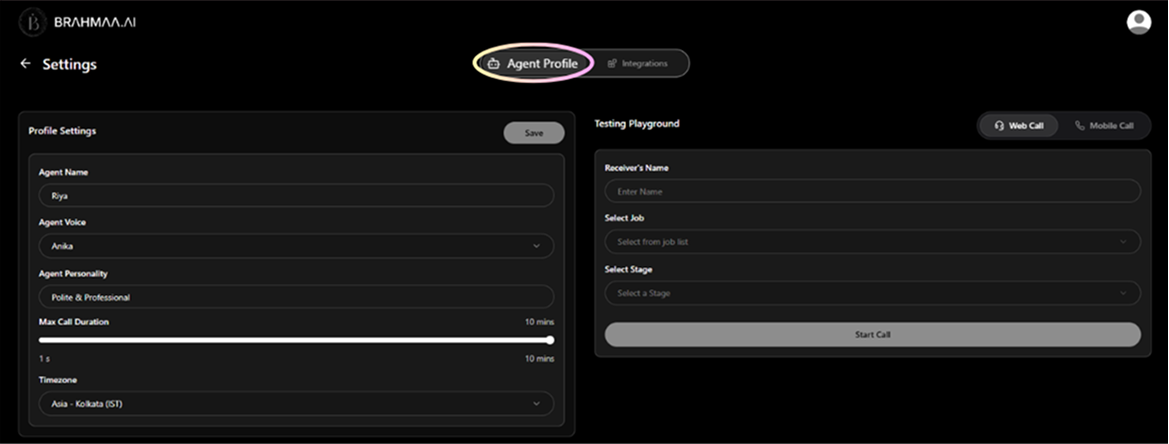
| Setting | What it does | Notes |
|---|---|---|
| Agent Name | The name Hansa uses when introducing itself on calls | Candidates hear this name when Hansa calls them |
| Agent Voice | Select from available voice options | Pick one that best represents your brand |
| Agent Personality | Sets the communication style (e.g. Polite and Professional) | Shapes how the agent speaks to candidates |
| Max Call Duration | Slider from a few seconds up to 10 minutes | Keeps calls focused and on credit budget |
| Timezone | Ensures calls, retries, and reminders go out at the right local time | Critical for accurate call scheduling |
Testing Playground
On the right side of the Agent Profile page:
- Enter a receiver's name
- Select a job and a pipeline stage
- Click 'Start Call' — choose web call (from your browser) or receive the call on your mobile phone
Tip: Always test before activating a new pipeline stage. It takes 30 seconds and shows exactly what the candidate will hear.
Was this article helpful?
Configure Your Agent