
Creating a Job · 2 MIN READ
Candidate Verification and Offer Rollout
Candidate Verification Stage
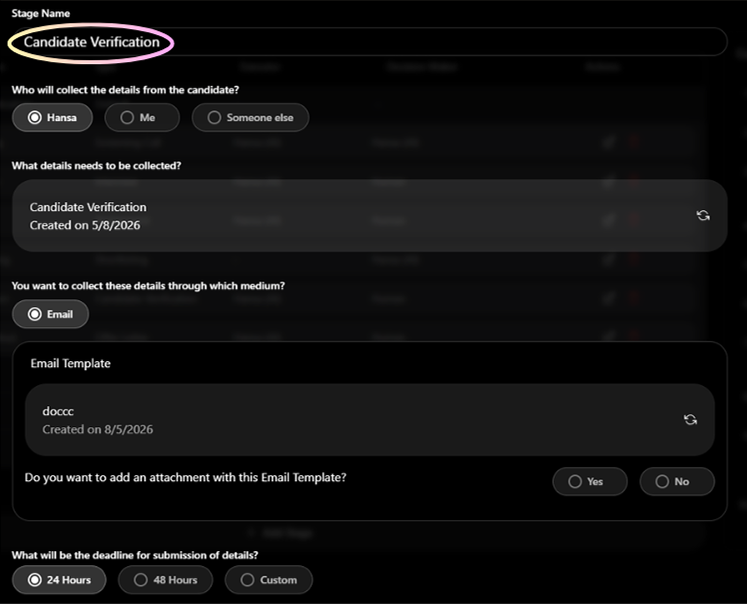
Collects important documents from shortlisted candidates before an offer is made.
What you configure
- Who will collect — Hansa (reaches out automatically), Me, or Someone else
- Verification form — defines exactly what documents the candidate must submit
- Communication channel — currently Email only when Hansa sends
- Deadline — 24 Hours, 48 Hours, or Custom
- Fallback action — Reject automatically, Inform Me, or Inform Someone Else
- Who reviews documents — Me or Someone else
- Feedback mandatory — Yes or No
Commonly collected documents
- Government ID Proof (Passport, Aadhar, Driving Licence)
- PAN Card
- Last Salary Slip
- Relieving Letter from previous employer
- Experience Certificate from previous employers
- Educational Certificates
- Background Check Authorisation
Q: Where do submitted documents get stored?
In the candidate's profile under the Submissions tab, and in Others > File Management > Candidate Documents Folder.
Offer Rollout Stage
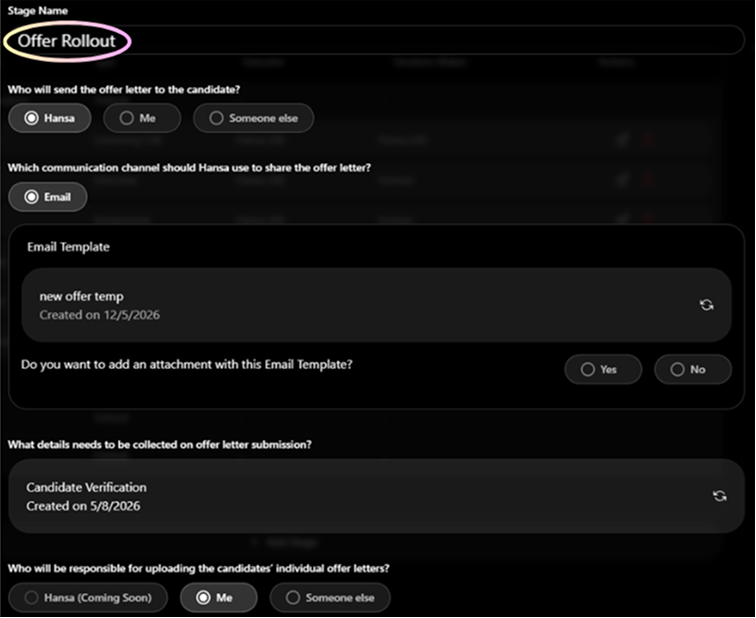
The final active stage before a candidate is marked as Hired. Manages sending the offer letter and collecting the signed copy.
What you configure
- Offer deadline — 24 Hours, 48 Hours, or Custom
- Fallback action if signed offer not returned — Reject, Inform Me, or Inform Someone Else
- Number of reminders — 3 Times, 5 Times, or Custom
- Reminder schedule — timing and channel (Call, WhatsApp, or Email)
- Who reviews the signed offer — Me or Someone else
- Who marks the candidate as Hired — Me or Someone else
- Feedback mandatory — Yes or No
The candidate can accept the offer digitally by clicking a link — no physical signature required.
Was this article helpful?
Creating a Job