
Creating a Job · 2 MIN READ
Task Stage
Task Stage
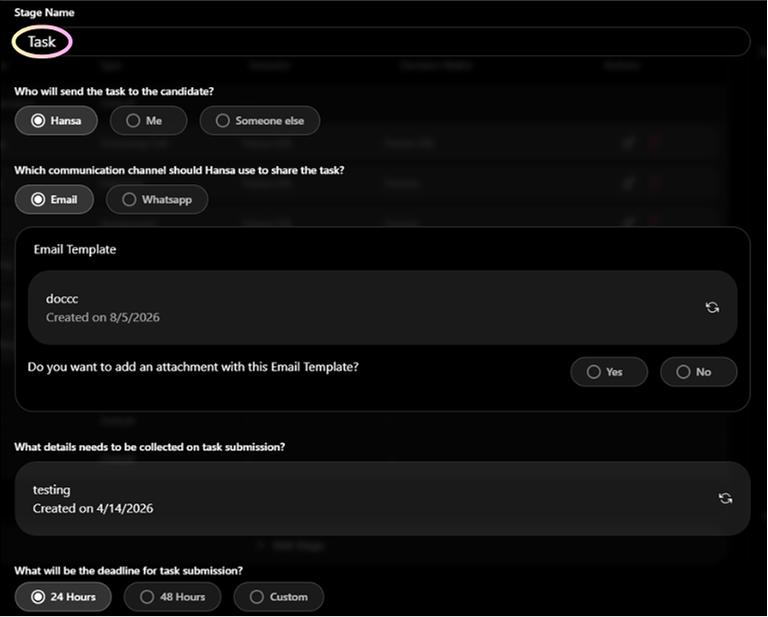
The Task stage sends candidates a practical assignment to complete within a set timeframe — a coding challenge, case study, or work sample. Hansa sends the task, tracks the deadline, sends reminders, and notifies you when a submission arrives.
What you configure
- Who will send the task — Hansa, Me, or Someone else
- Communication channel — Email or WhatsApp
- Attachment — toggle Yes/No to attach a task file (PDF, Docx, Zip, Excel — max 50 MB)
- Submission form — what the candidate must fill in to submit their work
- Deadline — 24 Hours, 48 Hours, or Custom (1–14 days)
- Fallback action — Reject automatically, Inform Me, or Inform Someone Else if deadline is missed
- Reminders — how many, on which channel, at what intervals
- Who reviews the submission — Me or Someone else
- Feedback mandatory — Yes or No
How to Create a Form
Forms collect structured information from candidates — for task submissions, document verification, and offer acceptance.
- Go to Others > File Management > Forms Folder, or open a stage and select 'Create New Form'
- Click '+ Create Form'
- Add fields: Text input, File upload (PDF, Docx, images), Multiple choice, Date, Signature
- Name and save the form
- Attach the form to a Task, Candidate Verification, or Offer Rollout stage
Tip: Forms are reusable — attach the same form to multiple jobs or stages without recreating it each time.
Frequently Asked Questions
Q: What if a candidate submits multiple times?
All submissions are stored with timestamps. The latest submission counts as the final one.
Q: What happens if the candidate misses the deadline?
The fallback action triggers. 'Inform Me' is recommended so you can follow up before making a final decision.
Was this article helpful?
Creating a Job