
Creating a Job · 1 MIN READ
Step 4: Job Settings
Step 4 — Job Settings
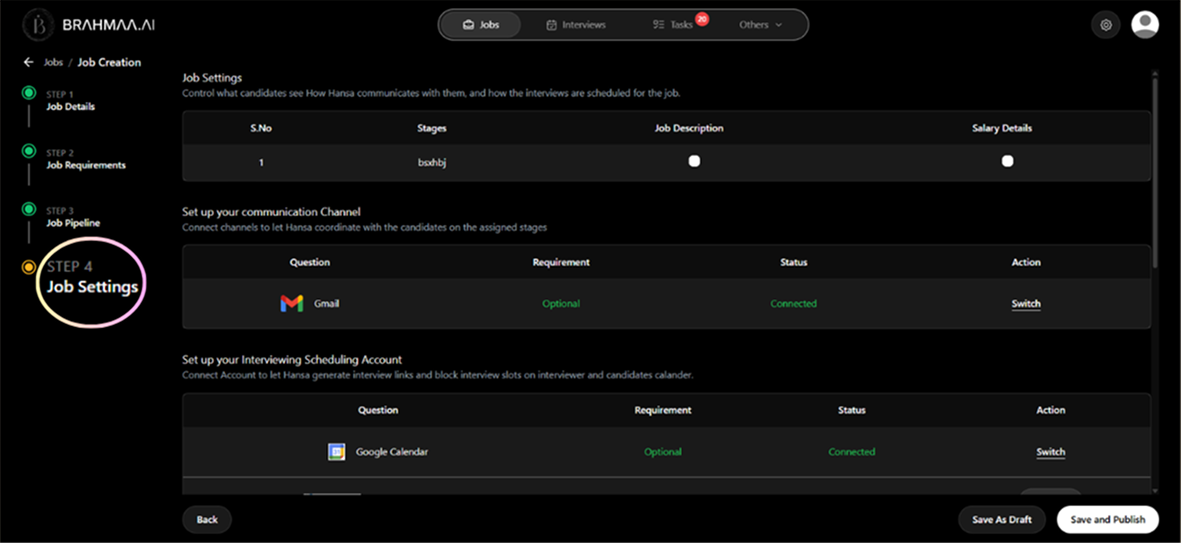
Data Sharing
Control what candidates see at each stage. For each pipeline stage, toggle whether to show the Job Description and Salary Details. For example — hide salary until the Interview stage so early applicants engage purely based on the role.
Communication Channels
Connect the channels Hansa will use to reach candidates for this specific job — WhatsApp, Gmail, or Outlook. If already connected globally via Settings > Integrations, the status shows 'Connected' in green.
Timezone & Calling Hours
Set the timezone of the candidates being contacted. Hansa will only call and message candidates within appropriate local hours. The 'Call on National Holidays' toggle defaults to OFF.
Was this article helpful?
Creating a Job