
Creating a Job · 2 MIN READ
Interview Stage and Communication Templates
Interview Stage
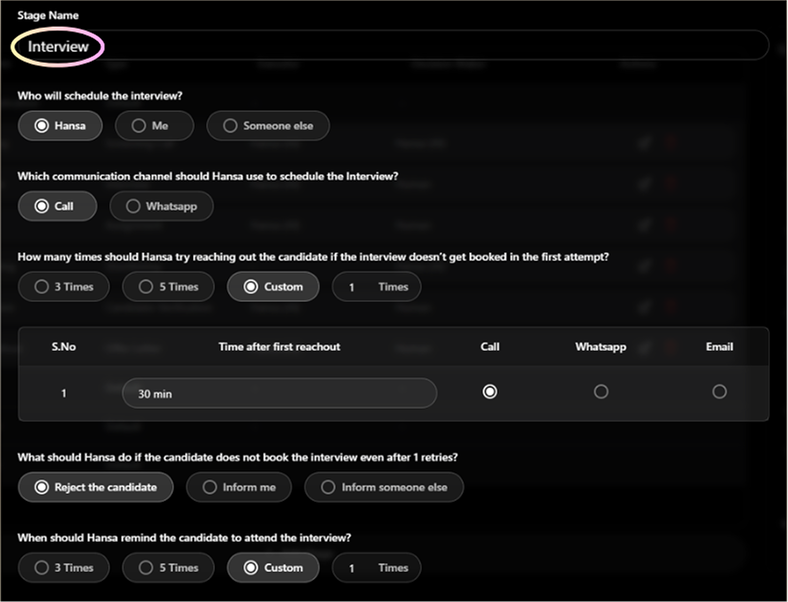
Hansa manages the entire scheduling process — the interview itself is always conducted by a human.
What you configure
- Who will schedule — Hansa (automated), Me, or Someone else
- Communication channel for scheduling — Call or WhatsApp
- Retry logic — if candidate doesn't respond to scheduling attempts
- Candidate reminders — how many to send, how far in advance, which channel
- Who will conduct the interview — Me or Someone else
- Interview duration — 15 Minutes, 30 Minutes, or Custom
- Feedback collection — if set to Yes, feedback is mandatory before the candidate can be moved
How Hansa schedules an interview
- Hansa contacts the interviewer to get available time slots
- Hansa reaches out to the candidate with mutually suitable slots to choose from
- Candidate selects a slot — or requests rescheduling if none work
- Hansa generates and sends calendar invites with meeting links to both parties
- If either party requests a reschedule, Hansa handles it automatically
Frequently Asked Questions
Q: Can I schedule an interview manually?
Yes. Navigate to the Interviews tab and click '+ Schedule New'. Select the candidate, interviewer, date, and time manually.
Q: Can interviews be conducted virtually?
Yes. Hansa generates Google Meet links for Google Calendar and Microsoft Teams links for Microsoft Calendar.
How to Create a Communication Template
Templates are reusable message formats for email and WhatsApp with dynamic variables that auto-fill with real candidate and job data.
- Go to Others > File Management > Templates Folder, or open any stage and select 'Create New Template'
- Choose Email or WhatsApp template
- Write your subject (email) and message body
- Press
/to insert dynamic variables - Save — the template is available across all jobs and stages
Key Template Variables
| Variable | What it inserts |
|---|---|
candidate_name | Candidate's full name |
job_role | Job title |
interview_booking_link | Candidate's interview booking link |
submission_link | Task submission link |
acceptance_link | Offer acceptance link |
company_name | Your company name |
Was this article helpful?
Creating a Job